 Re: Facebook Pixel with ebay Re: Facebook Pixel with ebay
[SIZE="3"]**  "This has been an issue for years," says Google search results... Don't mean to chime in all big and loud guys, "This has been an issue for years," says Google search results... Don't mean to chime in all big and loud guys,
but this is the first search result on Guggle when I was trying to figure this out,
so I thought I'd share for everyone. Consider me the random aut that made an account to post this!
If you don't know HTML, or Pixel code, no worries.
There is a 'Beginner Reference' for you at the bottom of this reply! Just
read through, learn and be like... "ah-ha!" later (it's a good feeling) Here's how to set up Facebook pixels on eBay
-- prologue
Javascript (regular pixel code) isn't allowed on eBay listings, but you can use <img width=1 height=1 style=display:none src="https://www.facebook.com/tr?id=PIXEL_ID&ev=EVENT_CODE" /> or <span style=height:1px;width:1px;display:none;background-image:url('https://www.facebook.com/tr?id=PIXEL_ID&ev=EVENT_CODE')></span> anywhere.
This doesn't allow for advanced tracking, or "set up pixel without code", but it does allow you to track page views and build custom audiences for people visiting certain products.
-- Put <img> Pixel in Listing: 1) Revise an listing on eBay
2) Scroll to description and hit the "HTML" tab
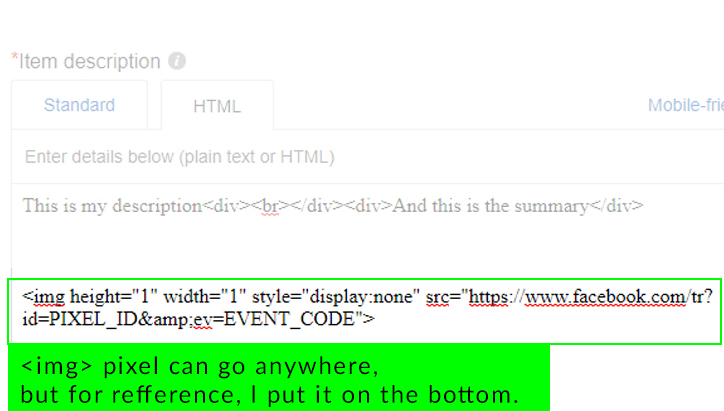
3) At the bottom, paste:
<img height="1" width="1" style="display:none" src="https://www.facebook.com/tr?id=PIXEL_ID&ev=EVENT_CODE">
- 
-- (*** be sure to replace PIXEL_ID & EVENT_CODE with your pixel data ***)
--
OH & even Google Analytics and others can be used in <img> tag format. <img width=1 height=1 style=display:none src="https://www.google-analytics.com/collect?v=1&t=pageview&dl={{Page_URL}}&dt=No%20Jav aScript&cid={{Random_Number}}&tid=UA-XXXXXXX-X>m=GTM-XXXX"/> Refference to Google Pixel
-- Beginner References: After you create a FB Pixel, find your PIXEL_ID, and default EVENT_CODE is PageView.
(EVENT_CODE link shows example: fbq('track', 'AddPaymentInfo'); where AddPaymentInfo is the event_code)
You can change the event code to anything you want and Facebook Business Manager will automatically log it for you.
It will appear in a few minutes on your FB Pixel's analytics dashboard, but only after you, or someone, visits the listing with the event code installed!
-- SOURCE:
Last edited by SaiJin; 02-26-2020 at 02:43 AM.
| 










